
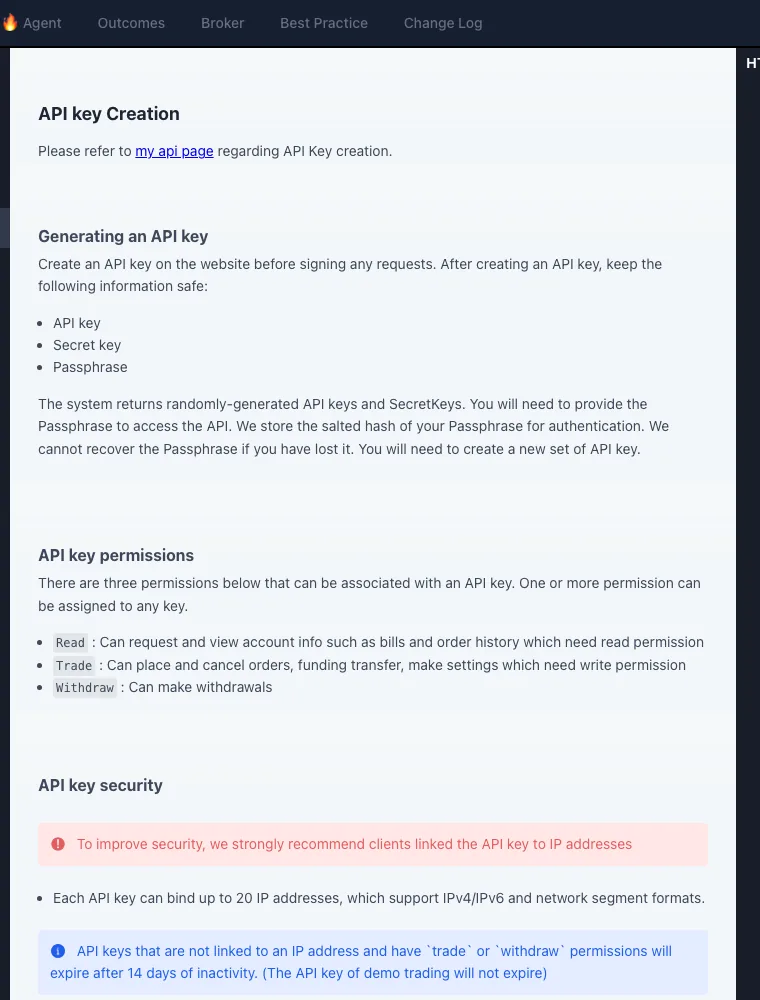
Create an OKX Exchange API key with Read for account data and add Trade only when the application must place spot or perpetual orders; ordinary trading bots do not need Withdraw. One live key can cover spot and perpetuals when the account mode supports both, while demo trading needs a separate demo key and `x-simulated-trading: 1`. OKX DEX or Onchain access uses a separate developer-portal project and key.
Choose your next API task
If credentials are ready, use the error-code guide for environment, timestamp and signature failures, or the Agent Trade Kit walkthrough for a read-only AI connection. This page remains the place to choose credentials and permissions; an accepted order still needs a separate state check before you call it filled.
The safest way to create an OKX API key
An API key should have one owner, one purpose and the smallest useful permission set. A portfolio dashboard normally needs Read only. A trading bot needs Read and Trade, but it does not automatically need Withdraw. A separate key makes it possible to revoke one integration without breaking every other application.
| Use case | Read | Trade | Withdraw | Recommended boundary |
|---|---|---|---|---|
| Portfolio or tax export | Yes | No | No | Read-only key; no order capability |
| Alerts and monitoring | Yes | No | No | Read-only key; IP allowlist if hosted |
| Trading bot | Yes | Only when required | No | Separate key, fixed IP, order limits in the app |
| Withdrawal automation | Yes | As required | Only after a security review | Isolate from ordinary trading and apply independent controls |
Three quantitative rules that affect production
| Rule | Official value | Operational consequence |
|---|---|---|
| Permission classes | 3 | Read, Trade and Withdraw can be reviewed separately; a bot does not require all three |
| IP addresses per key | Up to 20 | Multiple egress points are possible, but only actual production IPs should be listed |
| Non-IP key inactivity expiry | 14 days | Trade/Withdraw keys without an IP binding can expire after inactivity and need monitoring or rotation |
These values turn “secure the key” into testable controls: permissions can be enumerated, egress addresses documented and key expiry monitored.
Configuration examples for real integrations
| Integration | Data or action | Permission | Additional boundary |
|---|---|---|---|
| Portfolio or tax dashboard | Balances, fills and bills | Read | Server-side secret; scheduled retrieval |
| Price and risk alerts | Public market data plus account positions | Read | Use unauthenticated public endpoints wherever possible |
| Execution bot | Account queries, orders and cancellations | Read + Trade | Fixed IP, symbol allowlist, order/day limits and an emergency key-revoke path |
Withdraw is not a normal trading-bot requirement. If automated withdrawals are truly necessary, isolate them into a separate service, key, approval flow and limit.
How do I create an OKX API key for perpetual contracts?
Create an Exchange API key in the trading account, enable Read and then Trade, and keep Withdraw off. Confirm the account mode supports derivatives before sending orders. A USDT-margined perpetual uses an instrument such as BTC-USDT-SWAP; spot uses BTC-USDT. The private order endpoint is the same POST /api/v5/trade/order, but the instrument, trade mode, position settings and margin requirements differ.
Can spot and perpetuals use the same OKX API key?
Yes, a live Exchange API key can authenticate both spot and perpetual requests when it has Trade permission and the account is configured for those products. It is still safer to create separate keys when different applications own the spot and derivatives strategies: separate credentials make revocation, IP allowlisting and log review narrower. Demo and live credentials should never be shared.
Is Trade permission enough, or does a bot need Withdraw?
For account reads, order placement and cancellation, use Read + Trade. Withdraw is not required for a normal spot or perpetual execution bot. Enabling it increases the consequence of a credential leak without improving order execution. If withdrawals must be automated, move that function to a separate service, separate key and separate approval path.
How do I create an OKX demo trading API key?
Open Trade → Demo Trading → Personal Center → Demo Trading API, then create a dedicated demo key. Demo REST requests use the documented API host and must include x-simulated-trading: 1. OKX states that demo keys do not expire under the 14-day inactivity rule. A successful demo order validates request construction, but not live balances, production IPs or real-money risk controls.
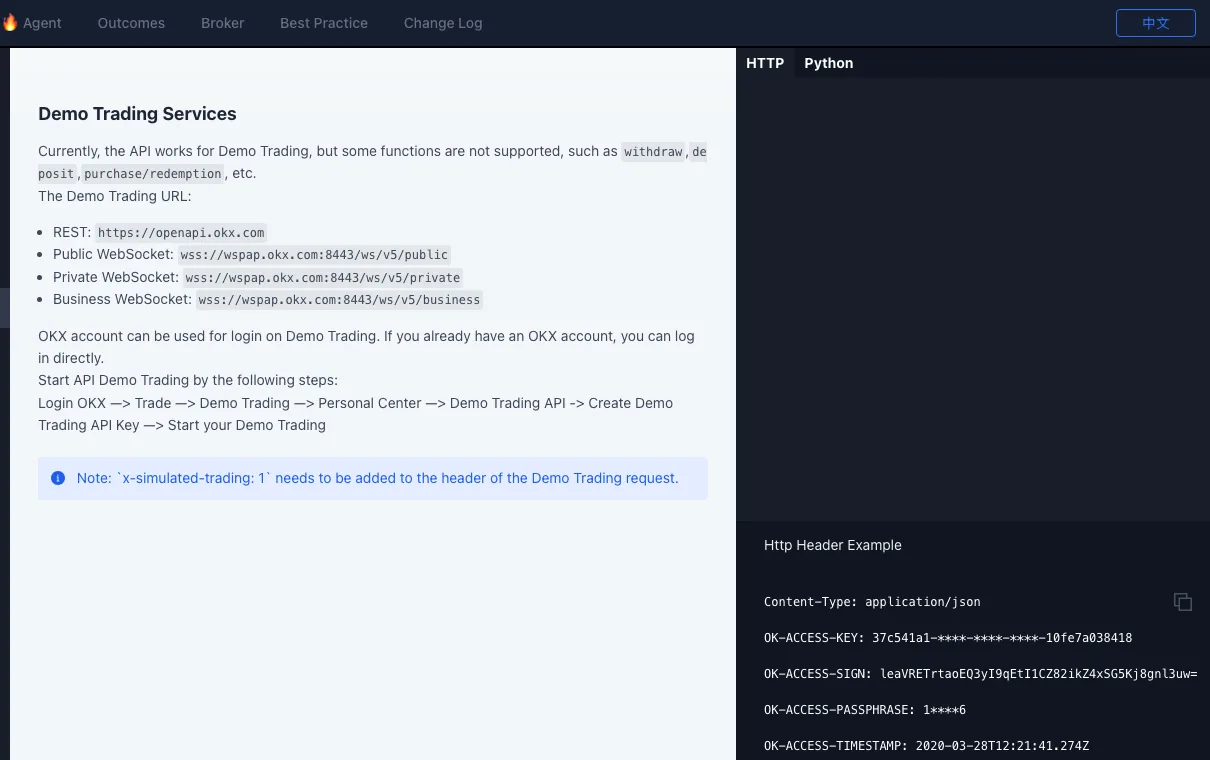
x-simulated-trading: 1 header. Screenshot captured August 21, 2026. Open the official section ↗What is the difference between OKX Exchange API and DEX or Onchain API?
| API family | Credential location | Main purpose | Typical asset control |
|---|---|---|---|
| Exchange V5 API | OKX trading account API settings | Centralized spot, perpetuals, balances and orders | Assets held in the exchange account |
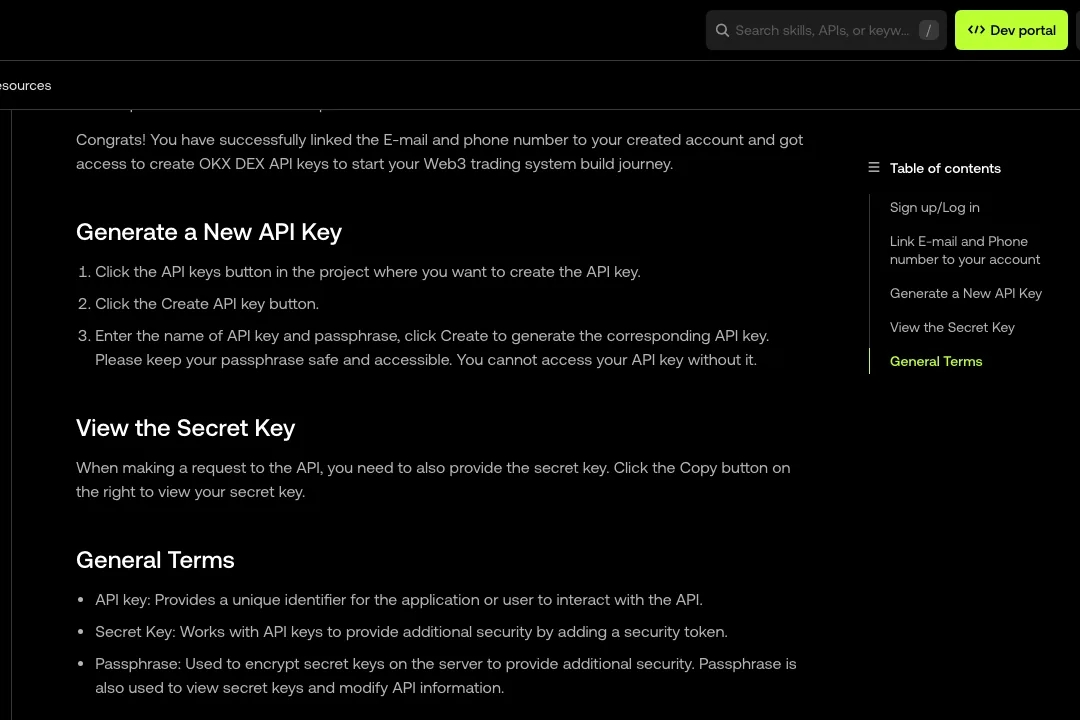
| DEX / Onchain API | Project in the OKX developer portal | Onchain quotes, routing and transaction construction | User wallet signs or sends onchain transactions |
The two products use similar authentication concepts but not the same project or API key. A DEX key does not grant centralized Exchange order permission, and an Exchange key is not the credential for the Onchain developer project.
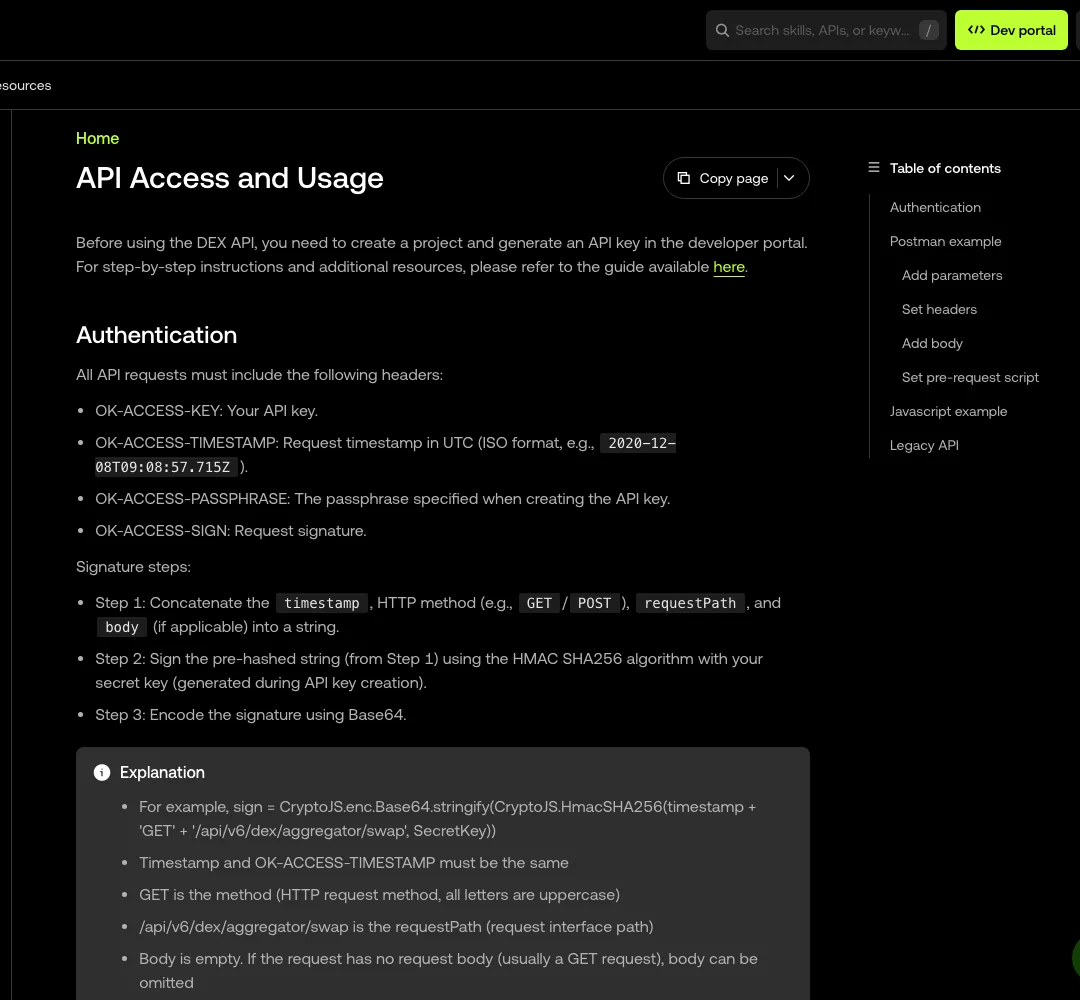
/api/v6/dex/aggregator/swap. Screenshot captured August 21, 2026. Open the official authentication page ↗Minimal OKX perpetual API request in demo mode
This example uses OKX’s documented Python SDK pattern and explicitly selects demo mode. Replace the placeholders with a demo key, confirm the demo account mode, and change price or size only inside the simulated environment.
import okx.Trade as Trade

api = Trade.TradeAPI(
    "YOUR_DEMO_API_KEY",
    "YOUR_DEMO_SECRET_KEY",
    "YOUR_DEMO_PASSPHRASE",
    False,
    "1",  # 1 = demo trading; 0 would be live
)

result = api.place_order(
    instId="BTC-USDT-SWAP",
    tdMode="isolated",
    side="buy",
    ordType="limit",
    px="10000",
    sz="1",
)
print(result)
The SDK’s demo flag adds the simulated-trading behavior. A raw REST client must sign the request and add x-simulated-trading: 1 itself. Never paste a real Secret or Passphrase into browser JavaScript, chat or source control.
Step-by-step setup
- Write down the task first. State which application will use the key and whether it reads data or sends orders.
- Open OKX through the OKX registration page, then navigate to API settings inside the authenticated account. Create a key for this application rather than recycling an old credential. The referral offer provides 20% off trading fees.
- Select the minimum permission. Begin with Read; add Trade only after testing.
- Store all credential parts immediately. Put the API key, secret and passphrase in a secret manager or encrypted environment configuration. Do not paste them into chat, source code, screenshots or analytics logs.
- Bind the key to a stable outbound IP when possible. Confirm the IP seen by OKX is the one used by the production server.
- Test one private read request. Verify authentication, time synchronization and account scope before enabling order methods.
- Create separate demo credentials. Do not use a successful demo request as proof that live credentials or live risk controls are correct.
How OKX REST signatures work
The official authentication guide describes a pre-hash string assembled from the request timestamp, uppercase HTTP method, request path and request body. That string is signed with the API secret using HMAC SHA-256 and Base64 encoded. Private REST requests also send the API key, signature, timestamp and passphrase in the documented headers.
prehash = timestamp + METHOD + requestPath + body
signature = Base64(HMAC_SHA256(secret, prehash))
The request path must include its query string, and the body used for signing must match the body actually sent. Keep system time synchronized and never log the secret or raw credentials while debugging.
Common authentication failures
| Symptom | Check first | Safe diagnostic |
|---|---|---|
| Invalid signature | Method, path, body and Base64 encoding | Log the pre-hash string with secrets redacted |
| Timestamp expired | Server clock and timestamp format | Compare the server clock with UTC |
| Invalid passphrase | The passphrase saved when the key was created | Recreate the key if the value cannot be recovered safely |
| Permission denied | Read, Trade or Withdraw scope | Call a read endpoint first; do not broaden permissions blindly |
| IP restriction | Actual outbound IP of the running server | Inspect egress from the production environment, not a laptop |
| Demo request fails | Demo key and demo request requirements | Recheck the official demo-trading section |
Pre-production security checklist
- one key per integration and environment;
- no API secrets committed to Git or bundled into browser JavaScript;
- Withdraw disabled for ordinary dashboards and trading bots;
- stable-IP allowlist where operationally possible;
- logs redact the API key, secret, passphrase and signature;
- a documented revoke-and-rotate procedure;
- order-size, symbol and loss controls enforced by the application; and
- a small live test only after demo and read-only checks pass.
When authentication is working, use the OKX fee calculator with the actual rate shown in your account rather than assuming one public headline rate applies to every user.
Frequently asked questions
Which OKX API permissions should I enable?
Start with Read. Add Trade only when the application must place or cancel orders. Leave Withdraw disabled unless a narrowly defined, reviewed workflow truly requires it.
Should I bind an OKX API key to an IP address?
Yes when your server or gateway has a stable outbound IP. An allowlist reduces where a leaked key can be used, but it does not replace secure secret storage or minimum permissions.
Are OKX demo and live API keys the same?
No. Treat demo and live trading as separate environments, create separate credentials, and use the demo-trading request requirements documented by OKX.
Why does OKX return an invalid signature error?
Common causes are a wrong timestamp, HTTP method, request path, body, secret, passphrase, or Base64-encoded HMAC result. Log the pre-hash string without logging the secret.
How many IP addresses can an OKX API key bind?
The OKX V5 documentation states that one API key can bind up to 20 IP addresses. A production integration should still list only its real outbound addresses.
Do OKX API keys expire?
OKX documents that a non-IP-bound key with Trade or Withdraw permission expires after 14 days of inactivity. Demo trading keys are excluded from that rule. Check the current account and documentation for the live status.
Can one OKX API key trade both spot and perpetuals?
A live Exchange API key with Trade permission can be used for both when the account mode and product access support them. The instrument IDs and trade modes still differ, and demo trading requires a separately created demo key.
Does a perpetual trading bot need Withdraw permission?
No. Read plus Trade is sufficient for ordinary account queries, order placement and cancellation. Withdraw should remain disabled unless a separately reviewed withdrawal workflow truly requires it.
Is an OKX DEX API key the same as an Exchange API key?
No. The Exchange V5 API key is created in the trading account for centralized spot and derivatives. The DEX or Onchain API uses a separate project and key in the OKX developer portal for onchain routing and transactions.